Skip to content50% offEarly bird access

Turn WooCommerce wishlists into sales you can measure

Smart WooCommerce Wishlist Pro emails shoppers when a saved product is back in stock or cheaper, shows what those wishlists sold, and sends you a weekly AI summary of what to restock. Early bird pricing from $49 a year.

Get ProSee how it works
  • 14-day money-back guarantee
  • One zip installs everything
  • Updates and support included
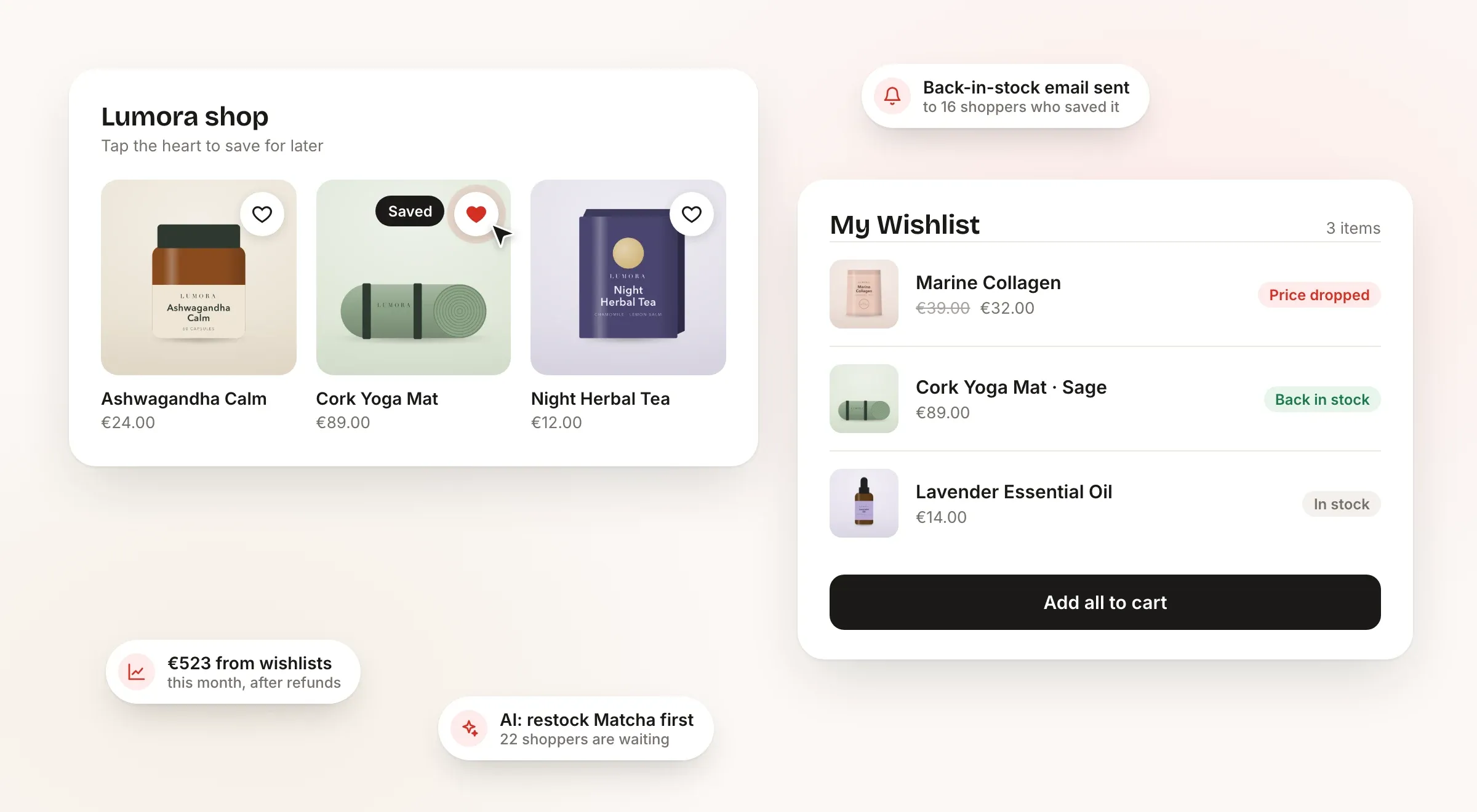
A shopper saves a yoga mat with the heart button; their wishlist shows a price drop and a back-in-stock item, with notes for a back-in-stock email, €523 from wishlists and an AI tip to restock matcha
Plugins and themes tested, version by version
15
Read-only reports your AI assistant can use
13
Front-end JavaScript and CSS, gzipped
< 4 KB
Upsell banners in your WordPress admin
0

Close the sales shoppers saved for later

Every saved product is a sale that hasn’t happened yet. Pro helps you close it, and shows you the number when it does.

Recover sales

Bring shoppers back

Customers who saved a product get an email when it’s back in stock or cheaper. They come back to buy without you sending a campaign.

Measure

Know what wishlists earn

Pro counts the sales that came from wishlists and from alert emails, after discounts and refunds. You see the number, not a guess.

Restock

Restock the right products first

Out-of-stock products get a score from 0 to 100, based on how many shoppers are waiting, recent saves and the sales at stake.

Discount

Discount only where it helps

Pro finds in-stock products many shoppers saved but few bought, and suggests a discount back to the price they saw, never more than 20%.

Works with your theme. Keeps pages fast.

Everything shoppers expect from a WooCommerce wishlist plugin, and it keeps your store fast.

Guest wishlists

Guests save without an account. Their items move into the account when they sign in or register.

Share links

Shoppers share a read-only list by link, phone share sheet or email. Shared lists stay out of search results.

Price-drop badge

The wishlist page shows today’s price, stock status and a “Price dropped” badge with the price at the time of saving.

Trending products

Saves this period compared with the one before, so you spot a rising product before it sells out.

CSV export

Download daily saves, top products and wishlist sales as CSV for your own reports.

13 reports for AI agents

Read-only reports through the WordPress Abilities API. Turn on MCP and your AI assistant can read them.

Fast, works with page caching

Under 4 KB gzipped and no jQuery. Your cache plugin keeps serving cached pages; saved items show up right after the page loads.

Blocks, shortcodes and Elementor

Three blocks for block themes, shortcodes for classic themes and three Elementor widgets.

Languages and currencies

Tested with Polylang, TranslatePress and CURCY. Price drops compare base-currency prices, so a currency switch never fakes one.

Built for the way your store sells

Find your store below and see how Pro fits.

Fashion and apparel

The exact size and colour is saved, and shoppers get an email when the product is back in stock.

Gifts and home

Signed-in shoppers keep separate lists, like “Birthday” or “New flat”, and share them with family.

Limited stock and drops

See how many shoppers are waiting for each sold-out product and restock in the order the scores suggest.

Seasonal sales

Before a sale, check which products many shoppers saved but didn’t buy, and how many of them a discount would reach.

Multilingual stores

Items show in the language they were saved in, and price drops ignore currency switches.

Agencies

One zip installs everything on each client store. Standard covers 5 sites and Pro covers 50.

5 reasons stores choose Smart WooCommerce Wishlist Pro

Analytics

See what your wishlists sold

Pro opens on Analytics: daily saves, your top products over 7, 30 or 90 days, and the products shoppers saved and then bought.

  • Sales from wishlists and from alert emails, after refunds
  • Median days from saving a product to buying it
  • Guests included, in your store’s base currency
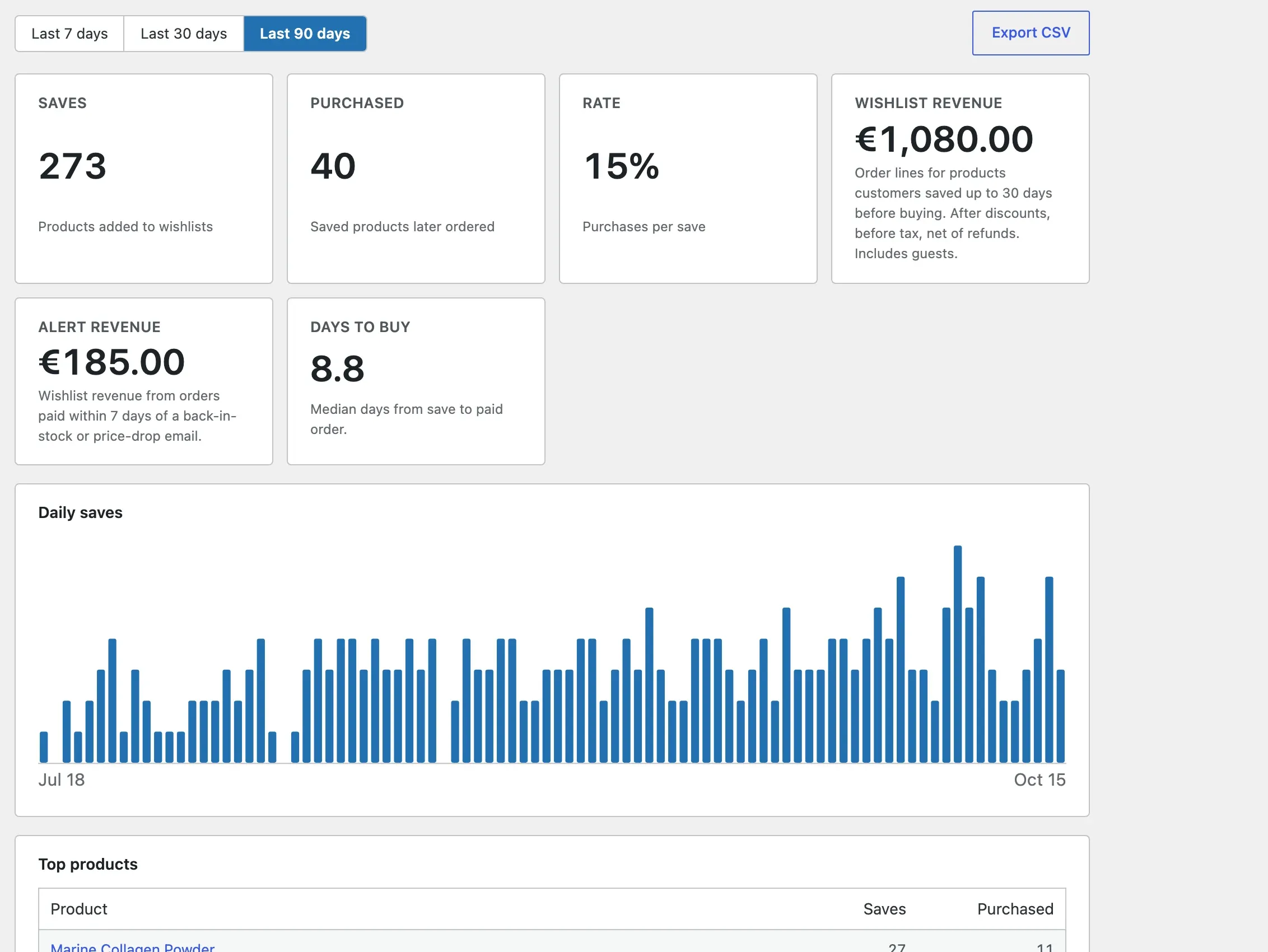
Analytics for the last 90 days: 273 saves, 40 purchases, €1,080 wishlist revenue and €185 from alert emails, with a daily saves chart
Alert emails

Email shoppers when it’s back

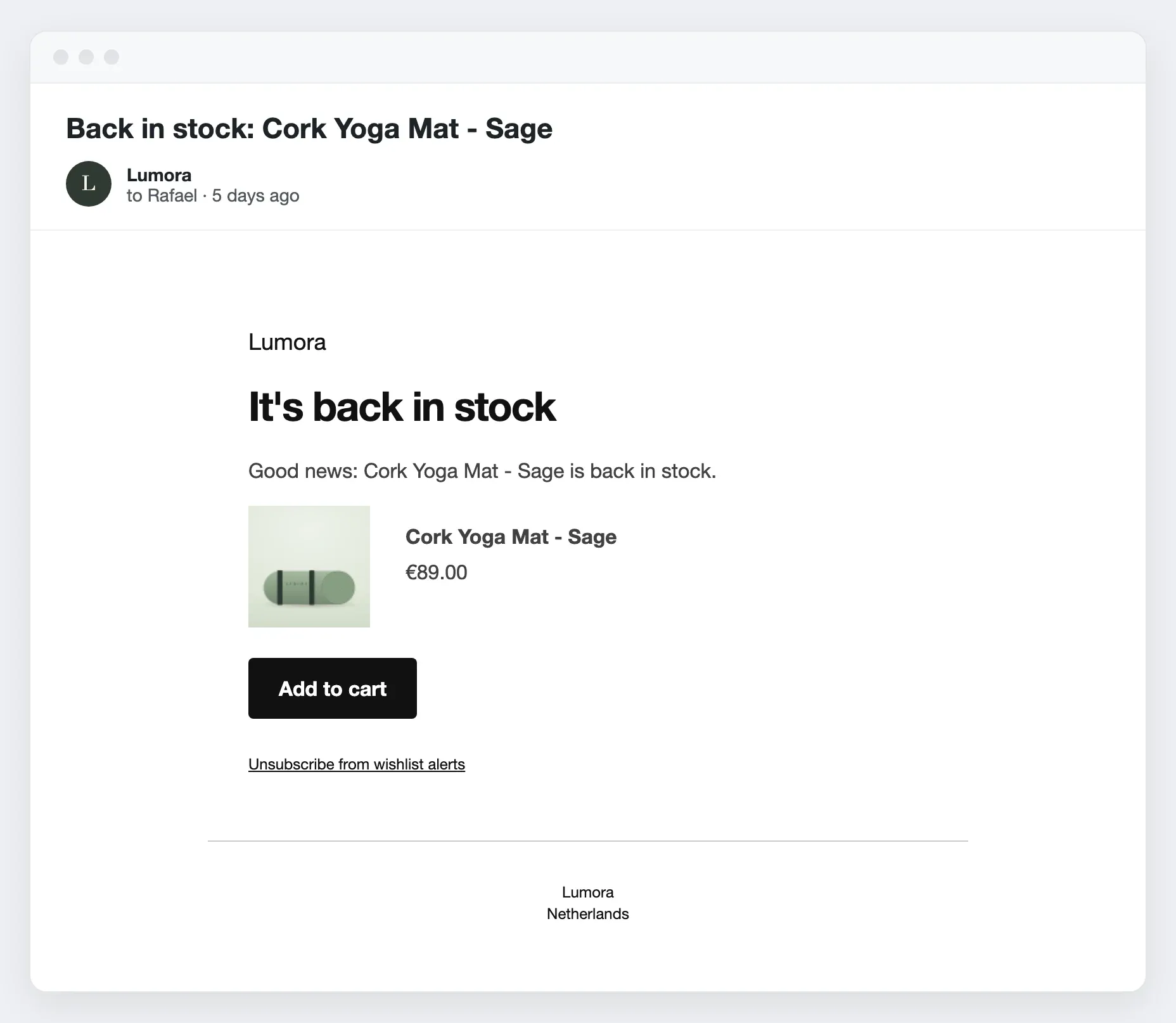
When a saved product is back in stock or cheaper, Pro emails the customers who saved it. These are standard WooCommerce emails, so you edit them where you edit the others.

  • Set the minimum price drop before an email goes out
  • One-click unsubscribe and an opt-out in My Account
  • See how many emails led to a purchase within 7 days
Back-in-stock email for the Cork Yoga Mat in sage, with the price, an Add to cart button and an unsubscribe link
AI insights

Get a weekly summary in plain words

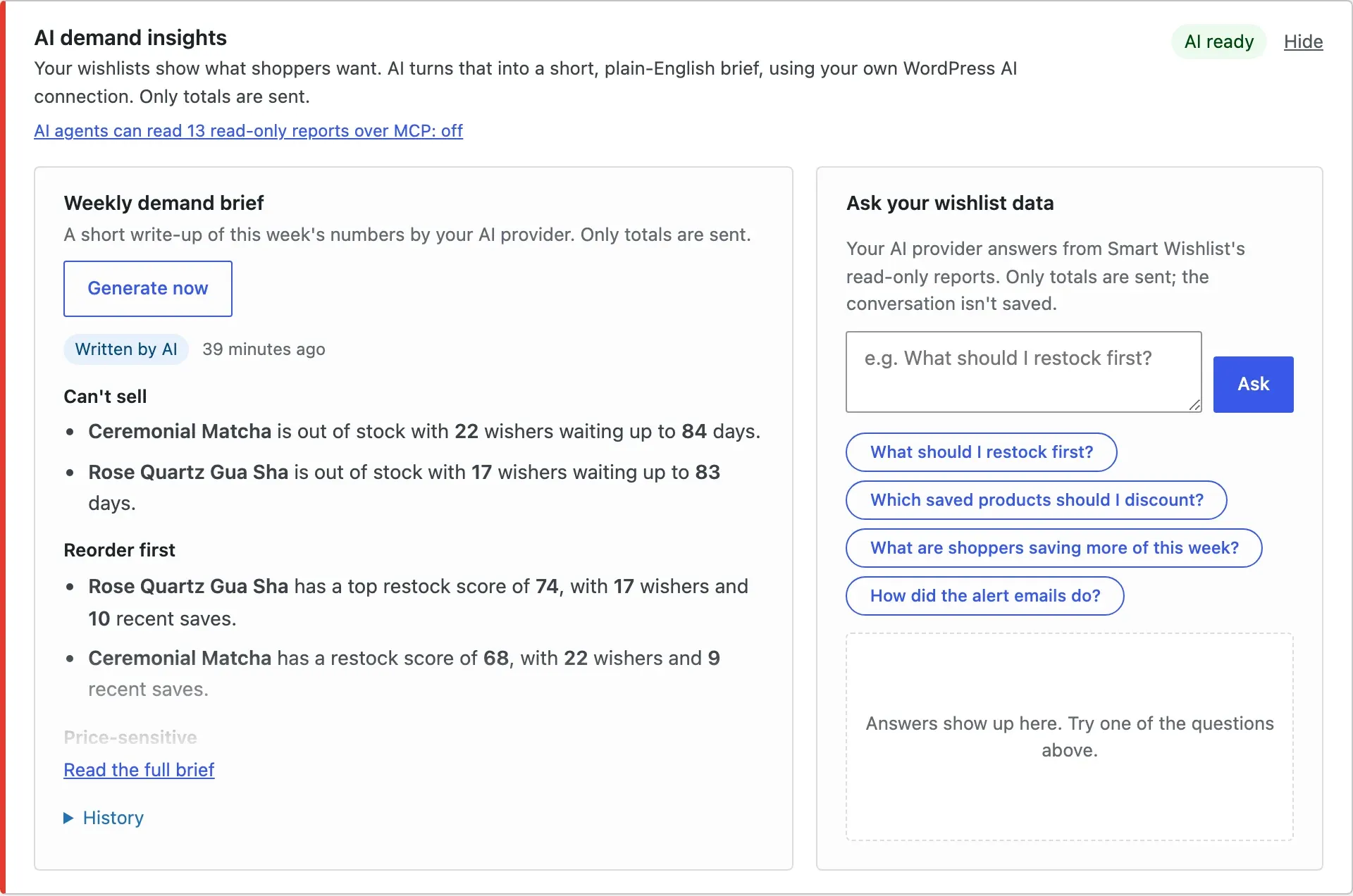
Once a week Pro writes a short summary of your wishlist numbers, using the AI provider you connected in WordPress, and can email it to you. You can also ask “What should I restock first?” and get an answer from your own reports.

  • No extra AI account or API key
  • Only totals are sent, never customer data
  • Every report still works without AI
AI demand insights on the Analytics screen: a weekly brief written by AI next to “Ask your wishlist data” with suggested questions
Multiple lists

Let shoppers keep more than one list

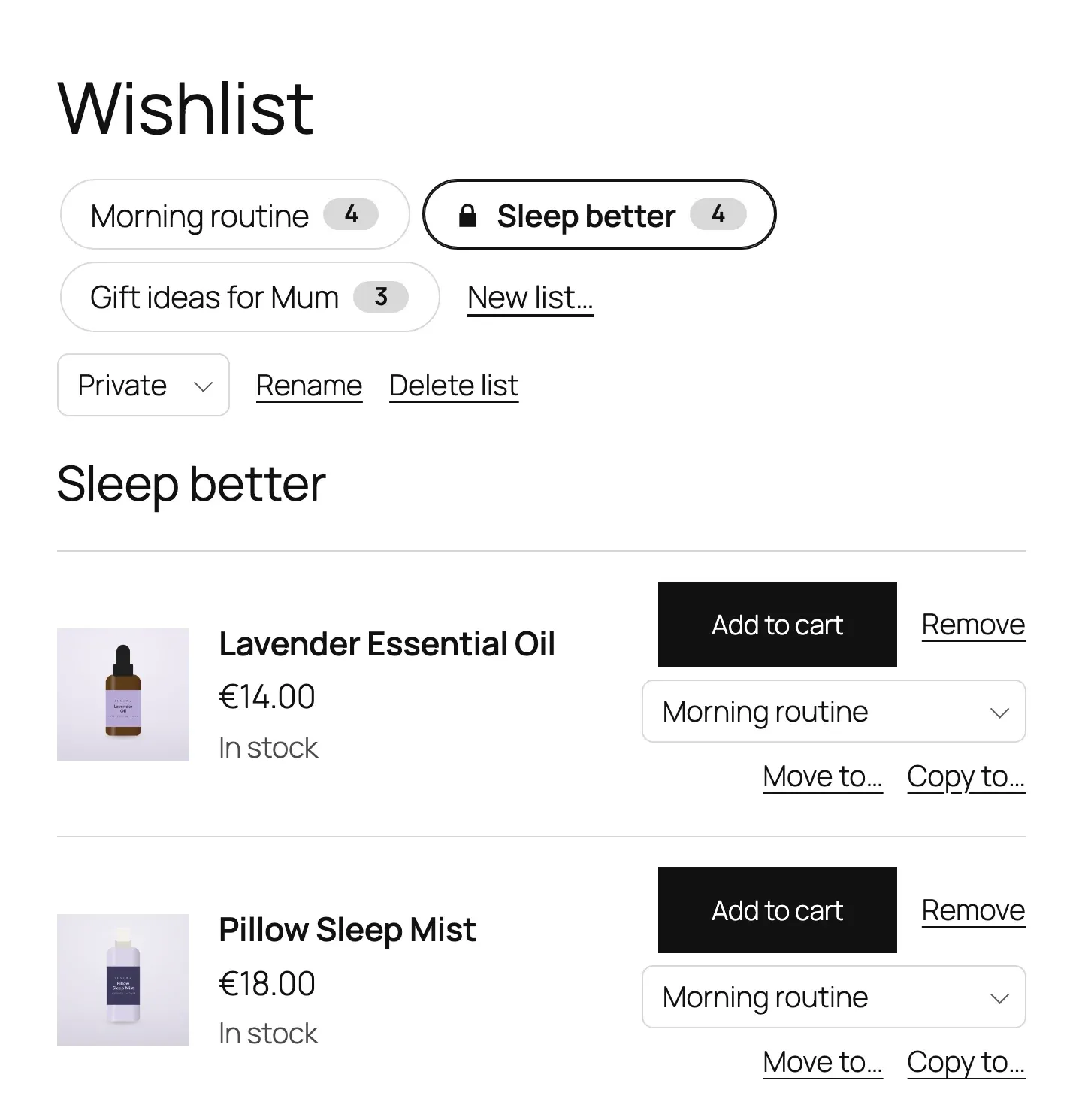
Signed-in shoppers name their lists, keep each one private or shared, and move or copy items between them. Guests keep one list until they sign in.

  • Up to 20 lists per shopper by default
  • Private or shared with a link
  • Move or copy items between lists
A shopper’s wishlist page with three named lists, one of them private, and buttons to move or copy items between lists
AI agents (MCP)

Let AI agents read your wishlist data

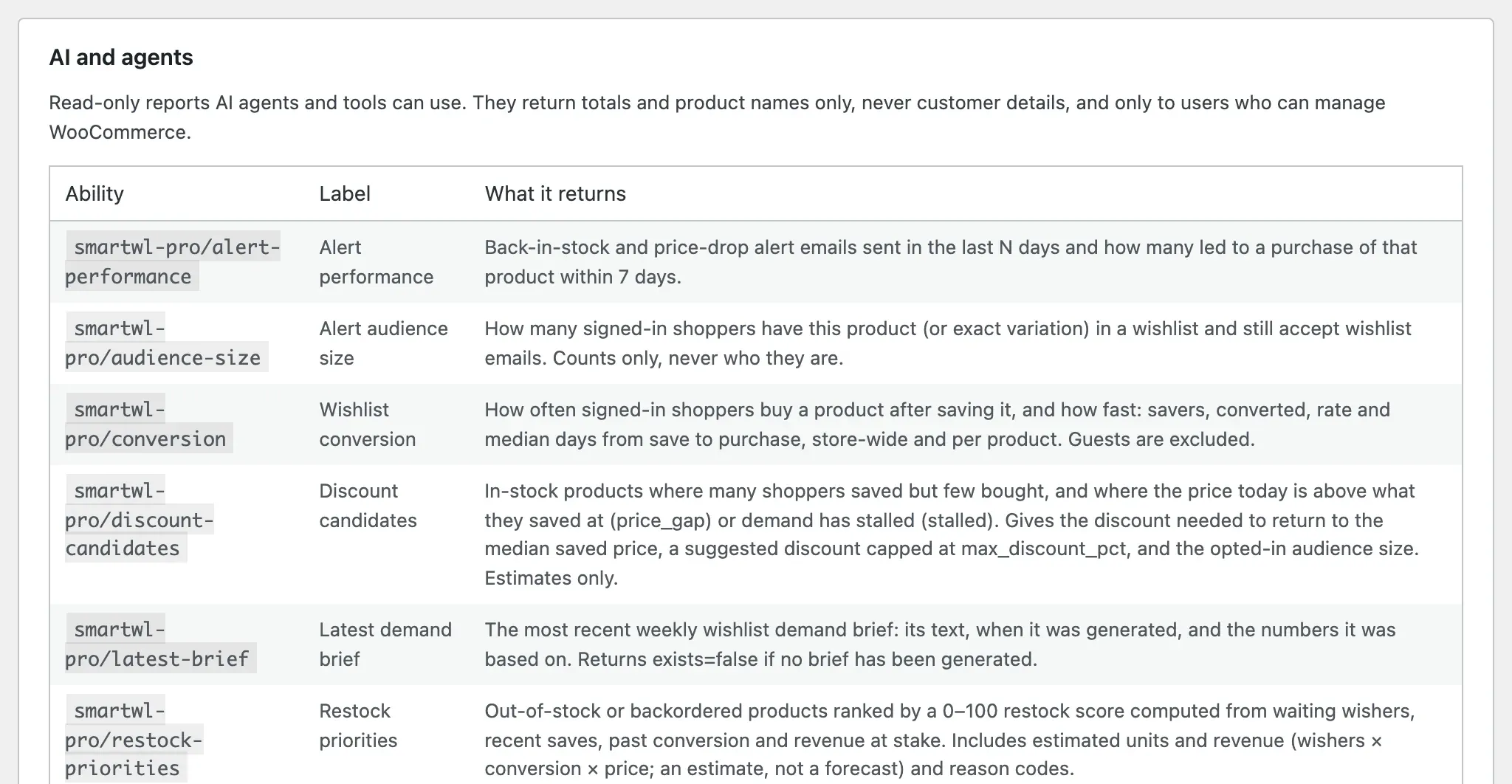
Turn on MCP and any AI agent that supports it can ask your store what shoppers want: what is most wished, what they can’t buy, what to restock first, which products need a discount and what wishlists sold. It works through WooCommerce’s own MCP server.

  • 13 read-only reports: 5 in the core plugin, 8 more in Pro
  • Totals and product names only, never customer details
  • Only for users who can manage WooCommerce
The AI and agents section of the Help tab: read-only reports such as alert performance, discount candidates, restock priorities and wishlist revenue

Start measuring in three steps

No setup wizard, and nothing else to download.

  1. 01

    Pick a plan

    Choose 1, 5 or 50 sites, yearly or lifetime, and download one zip.

  2. 02

    Upload and activate

    Go to Plugins › Add New Plugin › Upload Plugin. Pro installs the core plugin and opens on Analytics.

  3. 03

    Watch the sales come in

    Turn on alert emails. Sales from wishlists show up as shoppers buy.

Pick the plan for your sites

Every plan has every Pro feature. Plans differ only in how many sites they cover.

Billing

Basic

$99$49/year

Billed yearly. Cancel anytime.

For a single store.

Buy now
  • 1 website
  • Every Pro feature
  • Core wishlist plugin included
  • Updates and priority support

Standard

Best deal

$199$99/year

Billed yearly. Cancel anytime.

For a few stores.

Buy now
  • 5 websites
  • Every Pro feature
  • Core wishlist plugin included
  • Updates and priority support

Pro

$599$299/year

Billed yearly. Cancel anytime.

For agencies that run client stores.

Buy now
  • 50 websites
  • Every Pro feature
  • Core wishlist plugin included
  • Updates and priority support

Basic

$199one-time

Pay once. No renewal.

For a single store.

Buy now
  • 1 website
  • Every Pro feature
  • Core wishlist plugin included
  • Updates and priority support

Standard

Best deal

$429one-time

Pay once. No renewal.

For a few stores.

Buy now
  • 5 websites
  • Every Pro feature
  • Core wishlist plugin included
  • Updates and priority support

Pro

$799one-time

Pay once. No renewal.

For agencies that run client stores.

Buy now
  • 50 websites
  • Every Pro feature
  • Core wishlist plugin included
  • Updates and priority support

14-day money-back guarantee. If Pro doesn’t work as described, we refund you in full.

Questions store owners ask

What does Pro add to a WooCommerce wishlist?

Back-in-stock and price-drop emails, sales counted from wishlists and alert emails, an Analytics tab with CSV export, multiple named lists, a weekly AI summary, “Ask your wishlist data”, restock and discount suggestions, and eight more reports for AI agents.

Do I need to install anything else?

Only WooCommerce. The Pro zip carries the core wishlist plugin and installs and activates it when you activate Pro.

How are wishlist sales counted?

A sale counts when a shopper buys a product they saved, within 30 days by default. Pro uses the price after discounts and before tax, takes off refunds, converts to your base currency and includes guests.

Who gets the back-in-stock and price-drop emails?

Signed-in customers who saved the product. You set the minimum price drop, and every email has a one-click unsubscribe link. Customers can also opt out in My Account.

Do I need an AI account or API key?

No. The AI features use the provider you connected in WordPress under Settings › Connectors (WordPress 7.0 or newer). Only totals are sent: product names, counts, stock status and prices, never customer data.

What happens when my licence ends?

Pro keeps working. The licence gives you updates and priority support, so renew to keep getting them. No feature is locked behind the licence.

Will it slow down my store?

No. The front end is under 4 KB gzipped, uses no jQuery and loads only where a wishlist button, list or counter appears. Pages stay fully cached. We tested with W3 Total Cache and LiteSpeed Cache.

Can I get a refund?

Yes. If Pro doesn’t work as described, contact us within 14 days of buying and we’ll refund you in full.

Which versions does it need?

PHP 7.4 or newer, WordPress 6.5 or newer and WooCommerce 9.0 or newer. The AI summary needs WordPress 7.0, and the reports for AI agents need WordPress 6.9.

Start measuring what your wishlists sell

Early bird pricing from $49 a year, with a 14-day money-back guarantee. One zip installs everything.